


Let’s face it: hunting for Star Wars Movie FX Maker Codes is the closest thing to finding a real Jedi holocron in our galaxy today. There was a brief, beautiful window of time around the releases of The Force Awakens and Rogue One when Hasbro gave us a taste of true movie magic. By packing physical QR vouchers inside their action figure boxes, they allowed fans to turn a bedroom floor into a chaotic battleground on Jakku. You could point your phone at a plastic toy, and suddenly, stormtroopers were sprinting across your screen while X-Wings rained down heavy laser fire. It was the ultimate dream for young fans and adult collectors alike, bridging the gap between physical play and digital cinematography.
Unfortunately, time hasn’t been kind to this piece of augmented reality history. Hasbro officially retired the Star Wars Studio FX App years ago, purging it from the official iOS and Android stores and leaving a massive community of toy filmmakers stranded. If you try to open the old retail packaging today, you’re greeted with dead links and obsolete instructions. But the Star Wars fandom isn’t known for giving up easily. Thanks to a dedicated network of digital preservationists and toy collectors, it is entirely possible to resurrect this app. This in-depth guide will show you exactly how to bypass the digital graveyard, locate the proper codes, and start shooting your own cinematic space opera.
What Are Star Wars Movie FX Maker Codes?
To understand how to track them down, we first need to break down exactly what these digital keys are. When Hasbro launched their interactive toy lines a decade ago, they wanted to gamify the unboxing experience. The Star Wars Movie FX Maker Codes were special, high-contrast QR graphics printed on cardboard inserts inside the toy packaging. Under normal circumstances, players using the companion app had to record videos and slowly earn in-game points to unlock premium visual effects. Scanning one of these box-insert codes served as a total cheat code, immediately unlocking high-tier cinematic effects for free.
The brilliant quirk of this system lies in how Hasbro manufactured the toys. Instead of printing unique, single-use vouchers—like the redemption slips you get with Blu-ray discs—Hasbro utilized generic, mass-produced QR patterns. Every single box of a specific toy line contained the exact same image file. This means that a code packaged in a box in London works identically to one unboxed in Los Angeles. Because they aren’t tied to a single account, these master graphics can be infinitely shared, duplicated, and scanned off modern digital screens without losing their validity.
Where to Find Star Wars Movie FX Maker Codes Today
Since walking into a retail store to buy a brand-new 2016 Hasbro action figure box is no longer an option, finding a reliable Star Wars Movie FX Maker Codes repository requires a bit of internet archeology. The first and most reliable stop on your journey should be historical fan communities. Platforms like Reddit—specifically groups dedicated to toy photography or Star Wars collecting—have archived master threads where users compiled high-resolution photos of their original inserts. Searching these forums for legacy image links is a goldmine for anyone looking to rebuild their digital toolkit.
Beyond forum boards, image-heavy search engines are your best weapon. Pinterest and Google Images host dozens of fan-curated graphic sheets that aggregate the codes into single, easily scannable documents. When hunting for these files, you want to look for sharp, un-skewed images where the black-and-white grid lines are perfectly distinct. Dedicated Star Wars archiving websites like Rebelscum also maintain legacy database entries for the original toy lines, occasionally hosting direct scans of the documentation that came inside the vehicle sets.
Step-by-Step: How to Safely Install the Defunct Studio FX App
Before you can put your hard-earned Star Wars Movie FX Maker Codes to use, you need a functioning application to read them. Since you can’t just browse the Apple App Store or Google Play Store to find it, Android users will have to rely on sideloading an APK (Android Package Kit) file. This process involves downloading the legacy application file from a reputable, community-vetted app mirror site. Before executing the installation file, you will need to head into your Android device settings and temporarily toggle on the permission that allows installations from unknown, third-party sources.
For iOS users, the path is slightly more restrictive but entirely possible if you are a veteran collector. If you previously downloaded the Star Wars Studio FX App years ago using your Apple ID, you can navigate into your app store profile and look under your personal “Purchased” history tab. Apple keeps a log of your lifetime downloads, frequently allowing you to re-download retired apps directly from their servers. If you are entirely new to the ecosystem, using an older, secondary Android device or tablet is generally the easiest and most stress-free workaround to get the system operational.
How to Use Star Wars Movie FX Maker Codes (Step-by-Step Guide)
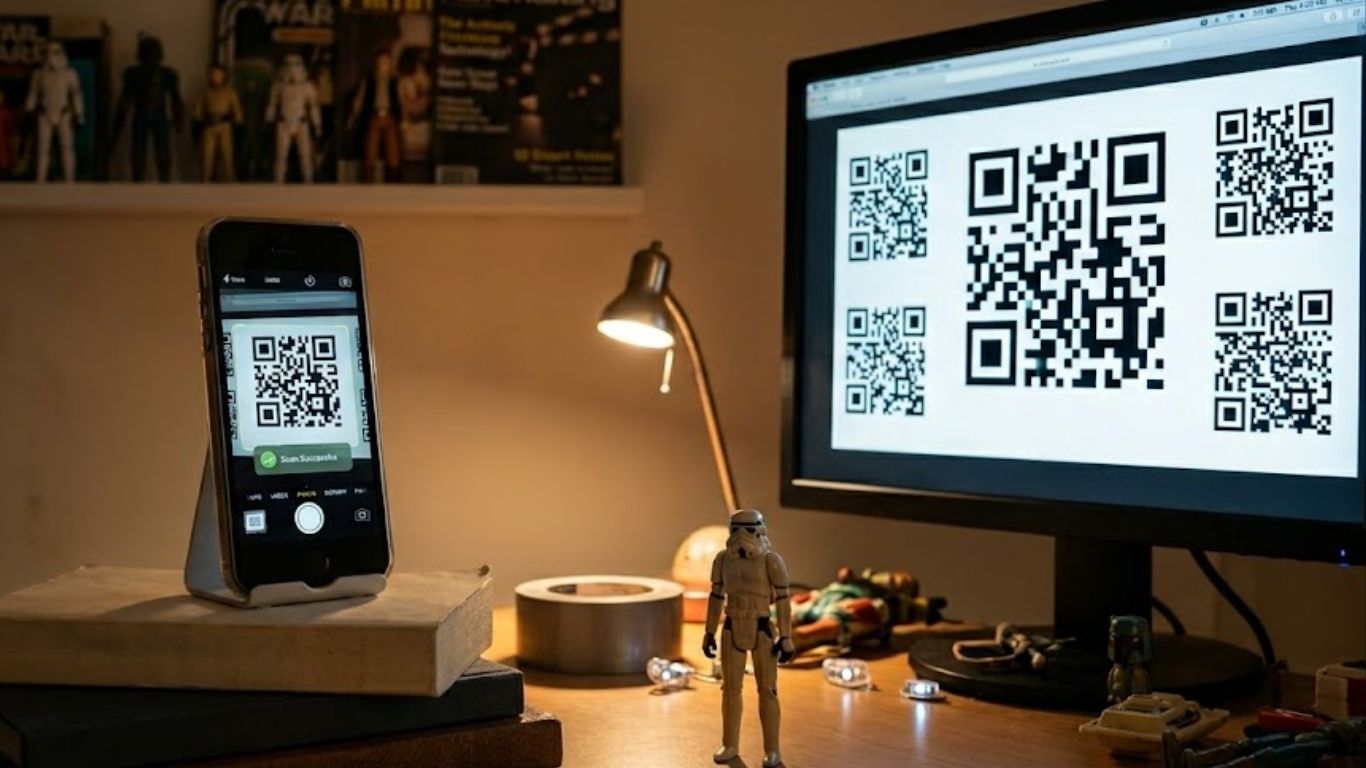
Once the application is up and running on your mobile device, the actual scanning process is incredibly straightforward. You don’t need to waste paper or ink printing out the scanned sheets you found online. Instead, simply pull up the image files of the Star Wars Movie FX Maker Codes on your desktop computer monitor, laptop, or a secondary smartphone. Make sure the display is clean and the image is zoomed in enough so that the QR pattern occupies a significant portion of your view screen.
Next, open the legacy app on your main filming device and head directly over to the camera utility section, often labeled as the “Unlock FX” menu. Position your phone so that its lens centers directly on the digital code displayed on your monitor. Hold your hand perfectly steady for a brief moment; the vintage software needs a second to register the pattern and calculate the data matrix. Once recognized, the app will trigger a retro sci-fi sound effect, accompanied by an on-screen notification confirming that your new premium visual effects pack is unlocked and ready for action.
Troubleshooting: Why Won’t My FX Maker Codes Scan?
It can be incredibly frustrating when you have the software running perfectly, but the camera refuses to register the image on your screen. The single biggest culprit behind this issue is monitor glare. Computer screens reflect ambient light from your room, creating bright white blind spots that mask the intricate details of the QR pattern. To fix this, dim your overhead room lights, draw the blinds, and tilt your phone at a slight angle relative to the monitor to completely eliminate harsh reflections.
Another common roadblock stems from modern screen resolution mismatches. If your source image is heavily pixelated or compressed, the app’s older scanning algorithm will fail to decipher the borders. Try adjusting the zoom level on your computer or looking for a cleaner, uncompressed source file. Finally, if the application freezes entirely during the scanning phase, it is likely struggling with modern multi-lens phone cameras. Manually overriding your phone’s camera permissions or forcing the app to run in a legacy compatibility mode can quickly get things back on track.
Top Fan-Favorite Special Effects You Can Unlock
The effort required to track down operational Star Wars Movie FX Maker Codes pays off handsomely the moment you dive into the production menu. One of the absolute best packs to unlock is the “Stormtrooper Invasion” overlay. This effect drops a beautifully animated squad of First Order troops into your frame, ducking and weaving while firing vivid crimson plasma bolts across your scene. It instantly adds a layer of frantic, high-stakes danger to any static toy display or backyard setup.
If you are a fan of vehicular space combat, the “X-Wing Strafing Run” code is an absolute must-have for your digital collection. This option allows you to coordinate a cinematic flyby of Rebel starfighters that zoom overhead, shaking the virtual camera and dropping heavy artillery explosions exactly where you tap the screen. For those who own the physical Hasbro AT-ACT walking vehicle toy, unlocking the dedicated control codes turns your phone into a complete remote targeting system, offering an unparalleled level of tactile immersion.
Crucial Safety Tips for Downloading Defunct Toy Apps
Venturing outside the walled gardens of official app stores always requires a healthy dose of digital caution. Because malicious actors know that fans are actively searching for terms like Star Wars Movie FX Maker Codes, they often set up deceptive trap websites. If a platform demands that you fill out a sketchy survey, input your credit card information, or download an executable file disguised as a “code generator tool,” close the tab immediately. Real legacy codes are static images, not software programs.
Stick exclusively to community-vetted android archives like APKMirror or historical forums where long-time community members vouch for the links. Before opening any downloaded application file on your phone, run it through an online scanner like VirusTotal to ensure it doesn’t contain hidden malware or adware. Taking these extra security steps keeps your personal data completely safe while you pursue your filmmaking hobby.
Modern Alternatives to the Star Wars Movie FX App
If you find that your brand-new smartphone simply cannot run the vintage Hasbro software due to operating system updates, don’t worry—your directing career isn’t over. There are brilliant modern alternatives available that can achieve the exact same cinematic style. The absolute gold standard is the Action Movie FX app developed by Bad Robot. This app features officially licensed, incredibly high-fidelity Star Wars asset packs that allow you to drop photorealistic BB-8 droids or crashing tie fighters into your footage with far better lighting integration.
Alternatively, you can tap into the power of modern desktop and mobile editing suites like CapCut or Premiere Rush. The internet is filled with free green-screen Star Wars laser blasts and explosion elements uploaded by generous VFX artists. By downloading these overlay clips, you can manually layer them over your toy videos. This method requires a slightly steeper learning curve than a simple scan-to-play app, but it grants you absolute creative control over the timing, color grading, and scale of your special effects.
The Intersection of Star Wars, Coding, and Creativity
It is worth pausing to clear up a common piece of confusion that pops up when searching for these assets online. Many educators and parents looking for Star Wars Movie FX Maker Codes accidentally stumble into a completely separate project called Star Wars: Building a Galaxy with Code. This is an official, highly praised educational initiative developed alongside Code.org for the global Hour of Code campaign.
While the Hasbro app was a pure filmmaking utility meant for visual entertainment, the Code.org platform is an educational game designed to teach kids the fundamentals of computer science. It uses a visual block-style interface to guide iconic droids like BB-8 and R2-D2 through complex mazes, teaching real JavaScript logic along the way. Both tools are fantastic ways to express creativity within the Star Wars universe, but one builds future software engineers while the other nurtures the next generation of visual effects artists.
You May Also Like: Joseph Obiamiwe Wilson
Conclusion
Resurrecting the magic of Star Wars Movie FX Maker Codes is a rewarding journey that blends tech nostalgia with pure creative filmmaking. While Hasbro may have stepped away from supporting the software, the enduring passion of the collector community ensures that these tools remain accessible to anyone willing to look for them. By tracking down clean code sheets, safely configuring a legacy device, and letting your imagination run wild, you can elevate your action figure collection into something truly spectacular. Charge up your tablet, frame your shot, scan those master QR grids, and start creating your very own cinematic adventures in a galaxy far, far away.
FAQs
Can I still find official Star Wars Movie FX Maker Codes?
Yes, while you can no longer buy them fresh off retail store shelves, high-resolution digital scans of the original cardboard inserts are widely preserved across community forums, Pinterest boards, and fan-run archival websites.
Does the Star Wars Studio FX app work on modern phones?
It can be hit-or-miss depending on your operating system. Modern Android devices can often run the app via sideloaded legacy APK files, while newer iOS versions might struggle with compatibility unless you are downloading it from your account’s past purchase history.
Are there any costs associated with using these legacy codes?
Not at all. Because the original Star Wars Movie FX Maker Codes were static, universal graphics printed across entire production batches, they can be shared and scanned entirely for free by the community today.
What is the difference between the Hasbro app and the Star Wars Hour of Code?
The Hasbro application is a filmmaking tool designed to overlay special effects onto real-world video footage of toys. The Hour of Code project is an interactive educational puzzle game by Code.org that teaches foundational computer science programming using Star Wars characters.
